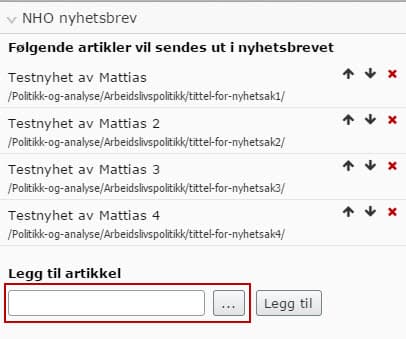
For the last couple of days I have been working with a custom dojo component that plugs into the assets panel. I needed a way to select a page from the content tree and had no idea how to do it so I started to dig around in the large and deep structure of ClientResources in the EPiServer.CMS.UI package and voilà, I found the epi-cms/widget/ContentSelector. Let's use it!
The server-side part
As I needed a way to pass settings to my dojo component, for example AllowedTypes and Roots for the content selector, I let my component inherit from EPiServer.Shell.ViewComposition.ComponentDefinitionBase and overrode the CreateComponent method.
public override IComponent CreateComponent() { IComponent component = base.CreateComponent(); component.Settings.Add(new Setting("startpageContentLink", SiteDefinition.Current.StartPage, false)); component.Settings.Add(new Setting("allowedTypes", new [] { typeof(PageData) }, false )); component.Settings.Add(new Setting("storeUrl", "/api/myapicontroller/", false)); return component; }The client-side part
Dojo template
<div data-dojo-attach-point="stateNode, tooltipNode" class="dijit dijitReset dijitInline"> <div class="dijit dijitReset"> <div class="nho-content-picker dijit dijitReset dijitInline" data-dojo-attach-point="contentPickerContainer"></div> <div data-dojo-attach-point="btnSelectPage" data-dojo-type="dijit/form/Button" data-dojo-attach-event="onClick: _onSelectPageClick">Add page</div> </div> </div>
Javascript
define( [ "dojo/_base/declare", "dojo/_base/lang", "dojo/dom", "dojo/dom-construct", "dijit/_WidgetBase", "dijit/_TemplatedMixin", "dijit/_WidgetsInTemplateMixin", "epi/epi", "epi-cms/widget/_HasChildDialogMixin", "epi-cms/widget/ContentSelector", "dojo/text!./templates/MyComponent.html", "xstyle/css!./styles/MyComponent.css" ], function ( declare, lang, xhr, dom, domConstruct, _WidgetBase, _TemplatedMixin, _WidgetsInTemplateMixin, epi, _HasChildDialogMixin, ContentSelector, template ) { return declare("alloy.components.MyComponent", [_WidgetBase, _TemplatedMixin, _WidgetsInTemplateMixin, _HasChildDialogMixin], { templateString: template, baseClass: "my-component", value: null, widgetsInTemplate: true, postCreate: function () { this.inherited(arguments); // Create an instance of the EPiServer ContentSelector. Pass in the settings defined in the server-side part. this.contentPicker = new ContentSelector({ roots: [this.startpageContentLink], allowedTypes: this.allowedTypes, showAllLanguages: false }); // Put the content selector in our container defined in the template. this.contentPicker.placeAt(this.contentPickerContainer); }, _onSelectPageClick: function () { // Do something with the value (ContentReference). console && console.log(this.contentPicker.value); // Empty the selector after you're done. this.contentPicker.reset(); } }); });